How I Code Today (Mar 2026)
Everything I build goes through two phases: designing and building. Testing is woven into both, but the split is real and I treat each phase differently. I’ve been working this way for a few months now, and the patterns have solidified enough that I wanted to write them down.
This is not a “10 tips for using AI” post. This is how I actually work, day to day, with the reasoning behind every choice. Some of it might seem obvious. Some of it might seem like overkill. But it works for me, and I think the why behind each pattern is more useful than the pattern itself.
I use two tools heavily: Claude Code and Codex (OpenAI’s coding agent). They’re good at very different things, and I’ve stopped trying to use one where the other fits better. Claude thinks wide. Codex executes. More on that in a second.
We’ll walk through the design phase first, then I’ll show you how I make a codebase agent-friendly (this is the step that makes everything else possible), and finally we’ll get into implementation and testing. The whole pipeline, start to finish.
Let’s get into it.

The Design Phase
I spend more time designing than building. Once the design is right, the building part is genuinely the straightforward part. Most of my learnings around AI-assisted coding have been about getting this phase right.
Starting with Wide Thinking
When I sit down to build something new, I open Claude Code first. I don’t start writing code. I don’t even start with a plan. I start with a conversation.
Claude Code is good at thinking wide. You give it a rough idea and it explores the space around it, asks about edge cases, surfaces connections you hadn’t considered. Codex, by contrast, is a focused executor. You give it a well-defined task and it delivers. Both are great, but they’re great at different things, and the design phase is where Claude Code shines.
So here’s what I do. I give Claude my initial thoughts on what I want to build. Just rough ideas, nothing polished. Then I ask it to ask me questions.
This is the single most useful prompt pattern I’ve found. Instead of me trying to write a perfect brief, I let the model interview me. Here’s a condensed version of what that looked like when I was designing Mahilo (an inter-agent communication protocol I built for OpenClaw agents):
Me: I want to build a protocol that lets AI agents from different OpenClaw users talk to each other. Like, one user’s agent can message another user’s agent. There’s a central registry that handles routing, and each user runs a plugin locally that connects to it.
Claude: A few questions to make sure I understand the trust model:
- Does the registry see message content in plaintext, or should messages be end-to-end encrypted between plugins?
- When a user’s agent sends a message, how does the registry know which of the recipient’s agent connections to deliver to? They might have multiple — a work agent, a personal one.
- What happens if the recipient’s callback URL is down? Do we retry, queue, or drop?
- Should there be any content-level filtering? Like, can a user say “don’t forward messages that contain my medical info”?
Me: Good questions. The registry should be a trusted processor for now — it can see plaintext. E2E encryption is a future goal. For routing, the sender should be able to target a specific connection by label. Retry on failure with a cap. And yes, I want a policy system — both simple keyword rules and LLM-based evaluation for more nuanced filtering.
Claude: That policy split is interesting. If the registry is trusted and sees plaintext, you could evaluate policies server-side. But if you later add E2E encryption, the registry can’t inspect content anymore — policies would need to move to the plugin. Want me to design the policy layer so it works in both modes from the start?
That last question is the kind of thing I would have discovered mid-implementation. The trust model directly affects where policy evaluation runs, and it would have been painful to retrofit. Because Claude surfaced it during design, we built a policy system with both local (plugin-side) and remote (registry-side) evaluation from day one.
The Design Doc
The first artifact that comes out of this conversation is a design doc. High-level. What the feature does, where it fits in the system, what it covers and what it explicitly doesn’t cover.
This is the document a product person could read. No class diagrams, no API schemas, no database tables. Just clear prose about what we’re building and why.
For Mahilo, the design doc ended up being over 1000 lines. Executive summary, vision statement, goals, architecture overview, core concepts like message routing and policy enforcement. Anyone could read it and understand what Mahilo was supposed to do without touching a line of code.
The policy system was the part where I spent the most design time. How do you enforce privacy between users in a way that’s non-intrusive and happens by itself? How do you let users define rules like “don’t share my medical info” without making them configure a dozen settings? I spent hours going back and forth between Claude Code and GPT-5.3, bouncing the design doc between them. Claude would propose a three-layer policy model (agent-level memory tags, plugin-level heuristic checks, registry-level LLM evaluation), GPT would poke holes in it, I’d refine, Claude would iterate. The final design had policies that learn from user behaviour instead of requiring upfront configuration. That took multiple sessions of focused thinking to get right, and it’s the kind of thing you can’t rush.
Here’s what the message flow looks like with policies at each layer:
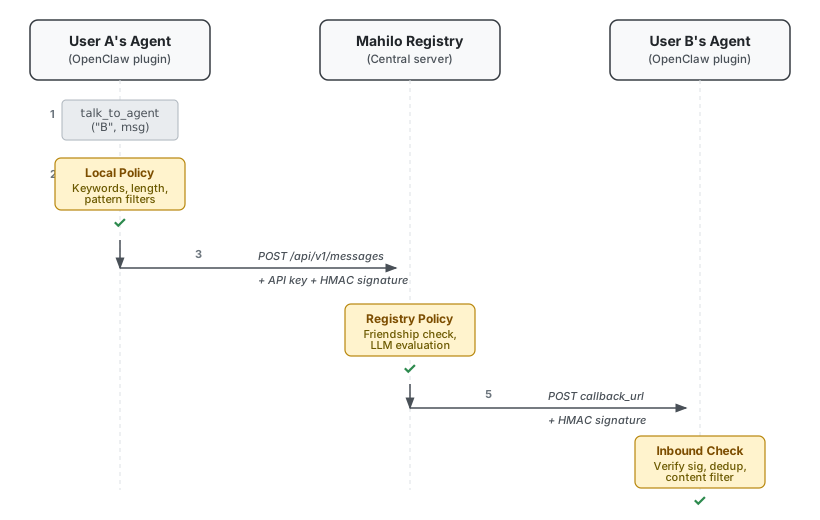
I spend the most time reviewing the design doc. If the design is wrong, everything downstream is wasted work. I’ve learnt this the hard way: skipping straight to a technical spec because I was excited to start building, only to realize two days in that I’d been solving the wrong problem. The design doc is where you catch that.
The Technical Doc
The second artifact is a technical doc. This is where we get into the specifics: classes, data flow, API contracts, database tables, webhook formats.
But here’s where I used to run into problems. If I just let Claude write code directly from the design doc, the output would be fine. Functional. But disconnected from the rest of the codebase. It would rewrite utility functions that already existed. It would make direct database queries instead of using the service layer that every other module uses. The code worked in isolation but felt foreign when you read it next to everything else.
The fix was sub-agent research. Before writing the technical doc, I spin up a bunch of sub-agents in Claude Code and send each one into a different part of the codebase to study how the specific feature I’m building connects to what already exists. One reads the existing message handling code. Another goes through the webhook implementations in other services. Another looks at how similar features were built before and what patterns they follow.
They come back with a map of existing patterns, utilities, and conventions relevant to the feature being built. This isn’t a general code style survey — that kind of thing should already live in your CLAUDE.md and be enforced by your bug bot. This is targeted research: how does this specific feature fit into this specific codebase? For Mahilo, I had three sub-agents running in parallel. Here’s the kind of thing one of them reported back:
Sub-agent (plugin architecture analysis):
Analyzed 6 existing plugins. Consistent patterns found:
Entry point:
index.tsexports a default object withidandregister(api). Registration is synchronous; async work goes ingateway_startlifecycle hook.Tools: Registered via
api.registerTool(tool, { optional: true }). Tool handlers useexecute(_id, params)returningAgentToolResult.Webhook routes:
api.registerHttpRoute({ path, handler }). Note: routes only match paths, not methods — handlers must enforce POST themselves.Config: Read from
api.pluginConfigon each request. Schema defined inmoltbot.plugin.json.Agent triggering: Plugins that need to trigger agent runs use
callGateway({ method: "agent" })— not direct function calls.Recommendation: follow this exact structure. The webhook handler pattern in the Matrix plugin is the closest reference for Mahilo’s inbound message flow.
Then we write the technical doc, and the code it describes is a coherent extension of what already exists. Without this research step, Claude would have invented its own plugin structure. With it, the Mahilo plugin used registerHttpRoute for webhooks, callGateway for triggering agent runs, and the same config-via-manifest pattern as every other plugin. No special snowflakes.
Cross-Repo Agent Teams
Some features span multiple repositories. Mahilo was one of them: I was building a plugin in one repo and a registry server in another. Two codebases, different deployment models, but they need to agree on how to talk to each other.
For this, I set up an agent team. Each agent gets assigned one repo. They each have their own design docs, their own context, their own understanding of their codebase. But they coordinate. They negotiate webhook payload formats, auth header conventions, error response shapes, callback URL requirements.
For Mahilo specifically, the plugin agent needed to know that the registry expects ed25519 public keys during registration, that callback URLs must be HTTPS in production but can be localhost in development, that message signatures use HMAC-SHA256 with a specific header format. The registry agent needed to know that the plugin expects a specific response shape for friend lists and group memberships. They worked this out together, and by the time I started writing code, the contract between the two repos was already settled.
Cross-Pollination: Claude Writes, Codex Reviews
Once the technical doc is solid, I do something that feels a little weird at first but has caught real issues every time: I hand it to Codex for review.
I ask specifically: “Does this make sense? Are there redundant API calls? Over-nested data structures? Anything that looks off?” Codex brings a different perspective. It’s like having a second engineer look at your design, one who wasn’t in the room when you made all the decisions, so they’re not anchored to your assumptions.
Here’s an actual example from Mahilo. The technical doc described webhook signature verification using JSON.stringify(body) to compute the HMAC. Codex flagged it:
Codex review: The HMAC is computed over
JSON.stringify(body), but JSON serialization doesn’t guarantee key ordering. If the registry serializes{"sender":"bob","message":"hello"}and the plugin re-serializes it as{"message":"hello","sender":"bob"}, the signatures won’t match. You should compute the HMAC over the raw request body bytes instead.
That’s a subtle bug that would have shipped. The tests might even have passed (same runtime, same serialization order). It would only surface in production when different runtimes serialize differently. Codex caught it in the design review, not in a 2am debugging session.
You take that feedback back to Claude, iterate on the doc, and it gets tighter. It’s the same reason code review works between humans. Two people who think differently will always catch more than one person thinking twice.

Making Your Codebase Agent-Friendly
You’ve got a design doc. You’ve got a technical doc grounded in your actual codebase. So you hand it to Claude and say “go build this,” right?
I tried that. On a fresh codebase with no context files, no conventions documented, no memory of past decisions. Claude produced code that worked, technically. But it used patterns I didn’t want, made assumptions I’d have caught in five seconds, and every new session felt like onboarding a contractor who’d never seen the project before. I was spending more time correcting than coding.
The implementation phase only works well if your codebase is set up for agents. This is just as important as the design phase, and it’s what makes everything else in this workflow possible.
The CLAUDE.md File
You probably already know what a CLAUDE.md file is. It’s like a README, but for your AI agent. Claude reads it at the start of every session to understand how to behave in your project.
What I didn’t appreciate early on is that it should be a living document. Claude can update it itself. As you discover patterns, make architecture decisions, hit weird gotchas, they go straight into this file. Over the course of a project, it grows into something genuinely useful.
It also doesn’t need to be a monolith. It can reference other files. Think of it as an index. The CLAUDE.md for one of my projects references coding style rules, build commands, multi-agent safety rules, release procedures, and platform-specific notes, all as sections or links to separate docs. When a new Claude session starts, it reads this file and knows how the project works, what patterns to follow, and what to avoid.
For Mahilo, I took it a step further. The CLAUDE.md acts as a session controller that tells the agent exactly what to do when it wakes up:
## How to Work
1. Check Progress — Read progress.txt
2. Pick Next Task — Find pending P0, follow dependency graph
3. Implement the Task — Write code + tests
4. Update Progress — Mark task done, add notes
5. Commit
Five lines that turn a general-purpose agent into one that can pick up where the last session left off. Without something like this, every new session starts from zero.
The Skills Folder
Ever walk Claude through a complicated multi-step task, get it working perfectly, and then realize you’ll need to do the same thing next week? And the week after?
This is where skills come in. A skill is a structured instruction doc that captures how to do something specific. I keep them in a skills/ folder, and every time I do something complex with Claude that requires particular context, I save it as a skill.
I have skills for accessing observability logs in my infrastructure. Skills for running tests across multiple repos. Skills for fetching secrets from Doppler. A skill for writing in my voice (which, funnily enough, is being used right now to write this post).
The pattern is simple: every complex task you do once should become a skill so you never walk Claude through it again. My skills/ folder has over 50 entries at this point. Some are five lines, some are a full page. The length doesn’t matter. What matters is that the knowledge is captured and reusable.
Decision Docs
During implementation, you make dozens of small decisions. “Should we use pattern A or B?” You pick one based on whatever context you have at the time. The code reflects your choice, but not your reasoning.
The problem is that the Claude session that made the decision is gone. Future sessions have no context for why pattern A was chosen. Was it a deliberate architectural choice? A quick hack? A compromise with known trade-offs?
So I write short decision docs. Here’s the actual format from Mahilo’s architecture-analysis.md:
# Decision: Server-Only vs Server+Plugin Architecture

## Options
Server-Only: Agents call registry API directly. Zero install friction.
  → But: registry sees all plaintext. No E2E encryption possible.

Server+Plugin: Agents use local Mahilo plugin.
  → But: installation step. Two components to maintain.

## Decision
Hybrid. Server-only for onboarding (low friction), plugin for
production (E2E encryption, local policy evaluation).

## Trade-off
We accept higher adoption friction for privacy guarantees.
Plugin is optional — server-only still works for non-sensitive use.
This is how you build institutional memory in an agentic workflow. Without it, you’re relying on the codebase alone to communicate intent, and code is famously bad at explaining why.
Bug Bot for Style Enforcement
Even with a well-maintained CLAUDE.md, agents miss things. They’ll use direct database calls when utility functions exist. They’ll import from the wrong path. They’ll introduce patterns you asked them to avoid three sessions ago.
A PR reviewer bot that enforces your project’s patterns catches what agents miss. Whatever anti-patterns Claude tends to produce in your codebase, you encode them in the bot’s config. When code gets pushed, automated review flags violations before they get merged.
The CLAUDE.md tells agents what to do. The bug bot catches what they didn’t do. Defence in depth. I’ve found this combination catches probably 90% of the style and pattern issues that would otherwise slip through.
So before you start handing tasks to agents, invest the time in setting up these four things. A living CLAUDE.md, a skills folder, decision docs, and automated style enforcement. I know it sounds like a bunch of overhead. It’s the opposite. It’s the work that eliminates repetitive overhead from every future session.
The Implementation Phase
Once the design is solid and the codebase is ready for agents, implementation becomes almost mechanical. I know that sounds like an exaggeration. But when you’ve got a tight design doc, a technical doc grounded in your actual codebase, and a CLAUDE.md that tells the agent how to behave, the building part is genuinely the straightforward part.
The trick is structure. You need to break work into pieces small enough that an agent can finish one in a single session, and you need to track everything so no work gets lost between sessions.
The PRD (Task Breakdown)
Before any code gets written, Claude breaks the feature into a PRD — a structured file with individual tasks. Each task gets an ID, a status, a priority level, dependencies on other tasks, acceptance criteria, and notes.
Here’s what a single task looks like in practice:
REG-021: Send Message Endpoint (P0)
├─ Status: done
├─ Dependencies: REG-019 (friendships)
├─ Acceptance Criteria:
│  - Validates friendship
│  - Supports idempotency_key
│  - Enforces max payload size
└─ Notes: POST /api/v1/messages/send
The scoping rule is simple: each task should be completable in one session. If it can’t be, split it further.
For Mahilo, the PRD had 5 phases, 51+ tasks with IDs from REG-001 through REG-051, and P0/P1/P2 priority levels. The agent doesn’t freestyle. It picks the next P0 task, follows the acceptance criteria, marks it done, and moves on. There’s a certain calm to watching an agent just work through a list.
Progress Tracking (Append-Only)
Alongside the PRD, I keep a progress.txt file. The rule: append-only. The agent appends what it did, what decisions it made, what files it touched.
By the end of Mahilo, progress.txt was 12.7 KB. Here’s what an actual session entry looks like:
### Session 1 - 2026-01-27 10:00 IST

Completed Tasks:
- REG-001: Initialize Project Repository
  Created TypeScript project with Bun runtime.
  Configured Hono HTTP framework, ESLint, Prettier.

- REG-002: Configure Database
  SQLite with Drizzle ORM (using Bun's native SQLite).

- REG-003: Setup HTTP Server
  Hono server with health check, logger, CORS, error handling.

Tech Notes:
- Switched from better-sqlite3 to Bun's native SQLite (bun:sqlite)
  due to compatibility issues.
- Switched from Vitest to Bun's test runner for same reason.

Tests: 23 unit tests passing.

Next Steps:
- REG-008: Create Policies Table (P1)
- REG-012: API Key Rotation Endpoint (P1)
Each session logged completed tasks, tech decisions with rationale, test coverage, and what to pick up next.
Why bother? Three reasons. First, I can review exactly what happened while I was away from the keyboard. Second, a new agent can read the file and know precisely where to pick up. Third, when something breaks, the progress file tells you what changed and when. Cheap investment for a lot of value.
Git Commits as Checkpoints
I make Claude commit after every meaningful piece of work. After every task, not at the end of a session.
Mahilo’s commits referenced task IDs directly: feat: Add interaction tracking (PERM-020, PERM-021), docs: Update progress - all P0 tasks complete. You can trace every commit back to a task in the PRD.
This matters for a few practical reasons. You can git bisect to find exactly which task broke something. New agents can read git log to understand the order of implementation. And you get natural rollback points if you need to undo a bad decision.
Agent Handoff
So why do all three of these things — PRD, progress file, commits — matter together? Agent handoff.
Context windows fill up. Sessions time out. You close your laptop and come back the next day. You need to hand off work to a fresh agent that has zero memory of what came before.
Without the tracking system, a new agent has to read the entire codebase, figure out what was already done, compare it against the design, and determine what’s left. That’s a lot of tokens burned on research before a single line of code gets written.
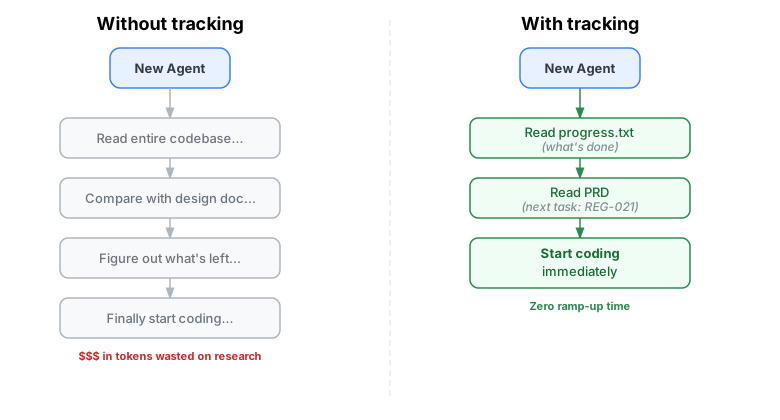
With the tracking system, the new agent reads progress.txt, reads the PRD, glances at the git log. And then it starts coding. Immediately.
With Mahilo, I could wake up, open a new session, say “continue where we left off,” and the agent would check the progress file, pick up the next P0 task, and start building. No ramp-up time. That felt like a breakthrough the first time it happened.
Parallel Agents
Because tasks are well-scoped and their dependencies are explicit, different agents can work on different tasks at the same time.
Each agent gets its own progress file. For multi-repo work, each repo gets its own progress file and its own PRD. Mahilo had this setup: the plugin had tasks-plugin.md and progress.txt, the server had tasks-registry.md and progress.txt. Separate tracking, but the agents coordinated on shared concerns like API contracts and authentication headers.
The tasks are independent enough that agents don’t step on each other, and the design docs keep them aligned on the bigger picture.
Testing
Tests in the PRD
The test plan comes alongside the design doc and technical doc. It’s written at the planning stage, before any implementation.
At that point it’s not concrete test code. It’s “what scenarios will we cover, what edge cases matter, what values should we verify.” In the PRD itself, each feature task has a corresponding test task. Write the feature, then write the test.
I review the test plan once before implementation starts. Just a quick pass to make sure we’re testing the right things.
The “Test the Real Thing” Problem
I need to be honest about some problems I’ve run into with AI-written tests.
Problem one: code duplication in tests. Claude will sometimes duplicate a module’s logic inside the test file and test that instead of importing the real module. The tests pass. Everything looks green. Then the real code breaks and you have no idea because your tests were never touching it.
The fix: an explicit instruction in CLAUDE.md — “always import the real module. Never recreate logic in tests.”
Problem two: over-mocking. Claude mocks the database layer when I actually want to test database queries. It mocks the HTTP client when I want to test real API calls. It’s trying to be a good citizen by isolating things, but it isolates so aggressively that the tests aren’t testing real code paths anymore.
The fix: another instruction — “only mock external services and boundaries. Test real code paths.”
These bit me more than once, I’ll be honest. They’re subtle because the tests pass. You feel confident. You deploy. Things break. And then you go back and realize the tests weren’t testing anything real. Both of these instructions now live permanently in my CLAUDE.md so every session reads them.

Test Output Summaries
I make Claude output the input and output for each test run. What did it send? What did it get back?
This lets me actually verify: “yes, when you sent X, you should have gotten Y.” It guards against hallucinated tests — tests that pass because the assertions are too loose, or because they’re checking the wrong thing entirely. A passing test suite means nothing if I can’t look at concrete inputs and outputs and confirm they make sense.
Don’t Shy Away from Unit Tests
In most of my repos, I have upwards of 1,200-1,500 unit tests. They run fast, they’re cheap, and they catch regressions before anything reaches production.
The Mahilo plugin alone had 239 tests covering API clients, signature verification, policy enforcement, and webhook handlers. For every small feature, write tests. It’s insurance.
And then have one or two integration tests that run the full flow end to end. The unit tests catch specific regressions; the integration tests catch systemic issues where everything works in isolation but falls apart when connected. You need both.
The Full Picture
Here’s the whole workflow, condensed:
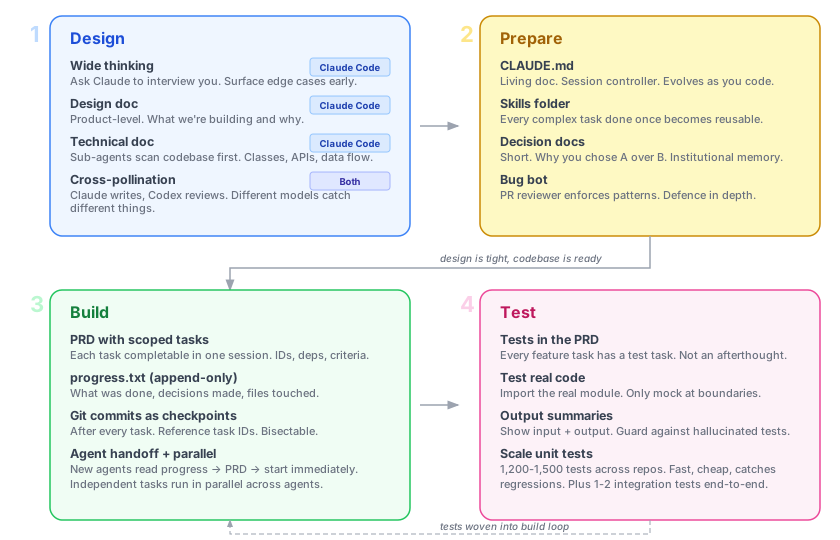
- Design: Explore with Claude Code. Produce a design doc (product-level) and a technical doc (grounded in codebase via sub-agents). Cross-pollinate with Codex for review.
- Prepare: Set up CLAUDE.md, skills folder, decision docs, and a bug bot.
- Build: Break work into a PRD with scoped tasks. Track progress in an append-only file. Commit after every task. Hand off between agents and run them in parallel.
- Test: Include tests in the PRD from day one. Test real code, not mocks of mocks. Verify with output summaries. Scale to hundreds of unit tests per feature.
Some numbers from Mahilo: two repos, two agent teams, 51+ tasks across 5 phases, 6,200+ lines of code, 6,800+ lines of documentation. All tasks completed. I could step away and come back saying “continue.” And it would.
None of this is about AI being magical. The same way good engineering practices like code review, CI/CD, and testing make human teams effective, good agentic practices make AI-assisted development effective. The agents are as good as the system you build around them.

This is how I code today. It’ll evolve — these tools move fast, and I’m sure I’ll look back at some of these patterns in six months and cringe a little.
This post is also a reference doc for myself. I want to be able to come back and see how I used to work, what I thought was important, what I got right and what I got wrong.
If you’ve found patterns that work for you, I’d love to hear about them. I’m always open to new ideas and new approaches. Half the things in my workflow came from seeing what someone else was doing and thinking “oh, that’s smart.”
Happy coding! ❤️